Using Webmail to create ‘Autoresponders’

1. Firstly, login to your mailbox using Webmail. In most cases typing your domain name followed by “/webmail” ( e.g. https://example.com/webmail OR https://webmail.example.com) will take you right to your login screen.
Alternatively, you can access Webmail directly from cPanel. We have a guide on how to access cPanel here: www.freethought.uk/help/how-to-login-to-cpanel/
2. Login to your mailbox by using your email address and password associated with that account.
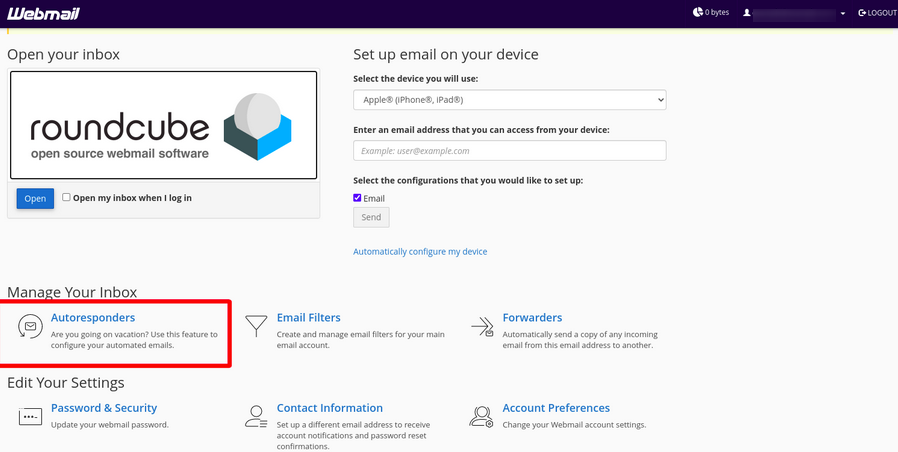
3. Once logged in please click Autoresponders.
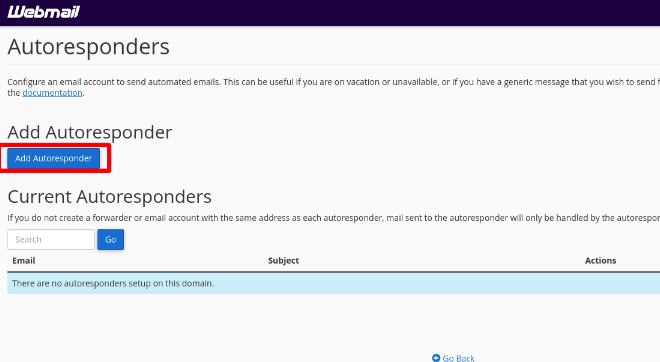
4. Next click Add Autoresponder
Fill out your autoresponder message within the “Body” field and select the times in which you want the settings to start and finish.
And that’s it, you’ve successfully added an Autoresponder via webmail.
Having trouble? Feel free to get in touch either via email or live chat and we will be happy to assist.