Suspending Access to a Site on ULTRA Cloud

Need to take a site offline for a bit? Whether you’re performing maintenance or just need a temporary “time-out” for a project, the ULTRA Cloud Panel makes it incredibly easy to toggle access on and off.
Step 1: Log In to ULTRA Cloud Panel
First, head over to www.freethought.uk and log into your ULTRA Cloud Panel. Once you’re in, you’ll see a clear list of all your active sites.
Step 2: Hit the Pause Button
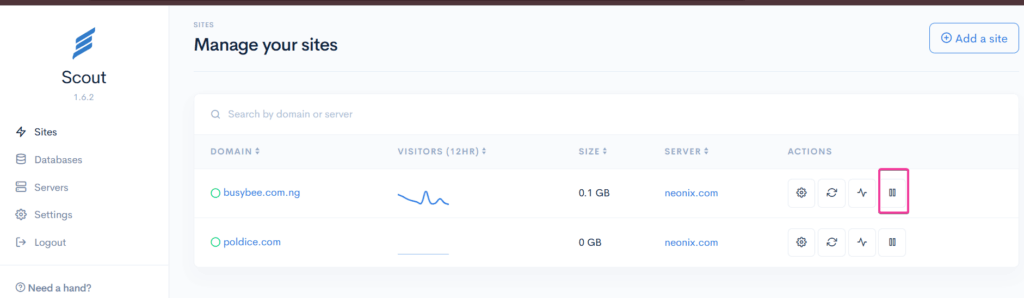
Find the site you want to manage. Look over at the buttons on the right-hand side.
To temporarily stop access, click the button with the Pause ( II ) symbol.
Step 3: Confirmation
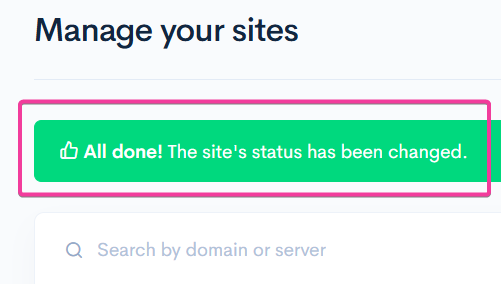
Once clicked, ULTRA Cloud will do its thing! You’ll see a notification pop up within the dashboard confirming that the website has been successfully suspended.
Step 4: Ready to go live again?
Restoring access is just as easy. When you’re ready for the site to be public again, find the same site in your list and click the Play ( ▷ ) button.
Access will be restored instantly!

That’s it. One click to pause, one click to resume. No fuss, no downtime complications. Your site’s on your schedule, not the other way around.
Happy Hosting!