cPanel Email Forwarders and Hotmail / Outlook.com – Troubleshooting Guide

Emails forwarded from cPanel to Hotmail or Outlook.com addresses can arrive inconsistently or not at all — particularly automated emails like OTPs and access codes. This is a known issue with several possible causes.
Why Does This Happen?
SPF alignment breaks on forwarding — when your hosting server re-sends a forwarded email, it sends from its own IP rather than the original sender’s. Microsoft’s filters may block this as the IP doesn’t match the domain’s SPF record.
cPanel spam auto-delete — cPanel’s spam filter may silently delete messages before they reach the forwarder, so they never get forwarded at all.
Microsoft filters transactional emails — OTPs, password resets and automated notifications are aggressively filtered by Hotmail/Outlook.com as potential phishing, sometimes without any bounce or notification.
Troubleshooting Steps
1. Check your Junk folder — forwarded emails may be landing there rather than being fully blocked.
2. Check cPanel spam settings
- Log in to cPanel → Email → Spam Filters
- If Automatically Delete New Spam is enabled, disable it or lower the spam score threshold
3. Add senders to your Safe Senders list in Outlook.com
- Find an email from the sender in your inbox or Junk folder
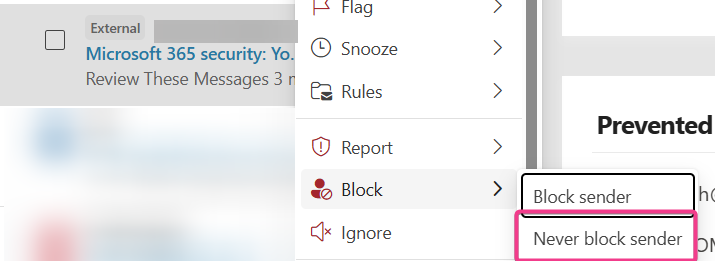
- Right-click the email and select Block
- From the dropdown select Never block sender
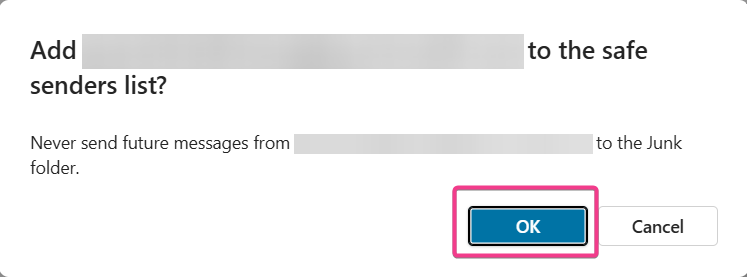
- Click OK on the popup to add the address to your safe senders list
4. Still not receiving emails? — the hosting server IP may be on Microsoft’s blocklist. Contact support and we can check the IP reputation and submit a delisting request if needed.
A Note on Email Forwarding Limitations
Forwarding to external providers has inherent deliverability limitations due to SPF/DKIM alignment. For more reliable delivery consider:
- Accessing your email directly via webmail or an email client
- Configuring your Outlook.com mailbox to fetch mail from your cPanel account via POP3 instead
When to Contact Support
- Steps above haven’t resolved the issue
- You need mail logs checked to confirm delivery or rejection
- You suspect the server IP is blocklisted by Microsoft