Identifying and troubleshooting account lockout notifications

Account lockouts can be confusing, especially when you receive a notification but don’t know which system triggered it.
This guide helps you identify the source of a lockout, review the relevant logs, and gather the right information before contacting support.
1. Common Sources of Account Lockouts
1.1 WordPress Security Plugins
Plugins such as Wordfence, iThemes Security, All‑In‑One Security (AIOS), and Limit Login Attempts Reloaded can block IP addresses after repeated failed logins.
Typical triggers:
- Incorrect WordPress admin password
- Bots attempting brute‑force logins
- XML‑RPC authentication failures
- Login attempts to invalid usernames
1.2 Email Authentication Failures
Mail servers block IPs after repeated failed logins to:
- IMAP / POP3
- SMTP (sending mail)
- Webmail
Common causes:
- Incorrect password saved on a device
- A phone or mail client retrying with outdated credentials
- A compromised device attempting authentication
1.3 cPanel / Plesk Login Protection
Control panels include built‑in security systems such as LFD (cPanel) or Fail2Ban (Plesk).
Triggers include:
- Incorrect cPanel/Plesk login attempts
- Failed FTP/SFTP logins
- Failed SSH logins
- Incorrect database credentials used by scripts
1.4 Server-Level Security Tools
Additional security layers may also exist on servers such as:
- ModSecurity (WAF)
- Config Server Firewall (CSF)
- Fail2Ban
- Sentry
These may block IPs for:
- Suspicious HTTP requests
- Repeated 404/403 errors
- Malicious URL patterns
- Excessive API calls
2. Checking WordPress Security Plugin Logs
If your site uses WordPress, start by checking whether a plugin blocked your IP.
2.1 Wordfence
- Log in to WordPress (or ask another admin to do so).
- Navigate to Wordfence → Tools → Live Traffic.
- Look for entries marked Blocked, Failed Login, or Brute Force.
Check:
- IP address
- Reason for block
- Username attempted
- Timestamp
2.2 iThemes Security / AIOS / Other Plugins
Logs are typically found under:
- Security → Logs
- Tools → Logs
- Dashboard → Security Events
Look for:
- Failed logins
- Lockouts
- IP blocks
- XML‑RPC failures
If you cannot access WordPress
Your IP may already be blocked. Try:
- Connecting via a different network (e.g., mobile hotspot)
- Asking another admin to unblock your IP
- Checking logs via the hosting file manager
3. Checking Email Authentication Logs
If the lockout affects email services, review your mail logs or device settings.
3.1 Check your devices
Common causes:
- A phone or laptop repeatedly retrying an old password
- Outlook/Apple Mail stuck with outdated credentials
- SMTP plugins in WordPress using incorrect login details
3.2 cPanel Email Logs
- Log in to cPanel.
- Go to Email → Track Delivery.
- Look for:
- Authentication failures
- Rejected logins
- SMTP errors
3.3 Plesk Email Logs
- Go to Tools & Settings → Mail Server Settings → Logs.
- Look for:
authentication failedinvalid loginpassword mismatch
Repeated failures from your IP indicate the likely cause.
4. Reviewing cPanel / Plesk Access Logs
4.1 cPanel
If you have WHM access:
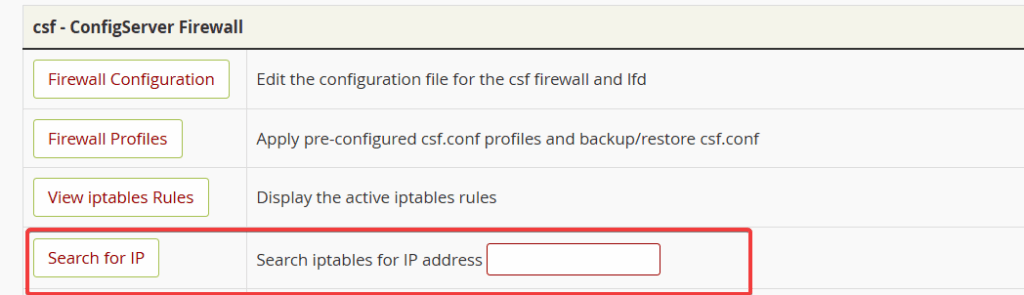
- Go to Config Server Firewall
- Use the Search IP to check if your IP has been blocked
- Unblock IP if listed
If you only have cPanel access:
- Check Metrics → Errors for related entries and reach out to support.
4.2 Plesk (Fail2Ban)
- Go to Tools & Settings → IP Address Banning (Fail2Ban).
- Review:
- Jail logs
- Banned IPs
- Authentication failures
5. Other Server-Level Logs
Depending on your hosting environment, additional logs may be available:
/var/log/secure/var/log/auth.log/var/log/maillog/var/log/messages/usr/local/apache/logs/error_log
Look for:
authentication failureinvalid userpassword incorrectmod_securityblocksfail2banbans
6. What to Provide When Reporting a Lockout
Providing complete information helps support resolve the issue quickly.
Please include:
✔ Your IP address
Find it at: https://whatismyipaddress.com
✔ Approximate timestamp of the lockout
✔ The service you were trying to access
Examples:
- WordPress admin
- Email (IMAP/SMTP)
- cPanel/Plesk
- FTP/SFTP
- Webmail
✔ Any error messages or screenshots
✔ Whether you recently changed a password
✔ Whether multiple devices use the same login
✔ Whether you checked WordPress/email/control panel logs
Include what you found (or didn’t find).
7. Quick Reference Table
| Symptom | Likely Source | What to Check |
|---|---|---|
| WordPress admin inaccessible | WP security plugin | Wordfence/AIOS logs |
| Email stops working on all devices | Email auth failures | Mail logs, device passwords |
| cPanel/Plesk inaccessible | cPHulk / Fail2Ban / CSF / LFD | Control panel access logs |
| Website loads but admin blocked | Plugin or ModSecurity | WP logs, Apache logs |
| Lockout after password change | Device retrying old password | Update all devices |