PHP Per-Domain Settings on cPanel Reseller Accounts

Overview
If you manage multiple domains or subdomains on a cPanel reseller account, you may need to run different domains on different versions of PHP. This is possible through a feature called MultiPHP Manager, which allows PHP versions to be set on a per-domain basis.
What Are PHP Per-Domain Settings?
By default, all domains on a hosting account may share the same PHP version. PHP per-domain settings allow each domain or subdomain to run on a different PHP version independently. This is useful when:
- One site requires an older PHP version for compatibility with legacy plugins or applications
- A newer site requires a more recent PHP version
- You are migrating sites gradually between PHP versions
Which Hosting Plans Support This?
PHP per-domain settings are available on cPanel Reseller hosting plans. If you are unsure whether your plan supports this feature, please contact our support team.
How to Request Enablement
PHP per-domain settings are managed at the server level and may need to be enabled for your reseller account by our support team. To request this:
- Raise a support ticket
- Include the following information:
- Your reseller account username
- The domain(s) or subdomain(s) that require a different PHP version
- The PHP version required for each domain
Our team will enable the feature and confirm once it is ready.
After the Feature Is Enabled
Once enabled, you can manage PHP versions for individual domains directly from your cPanel WHM:
- Log in to cPanel
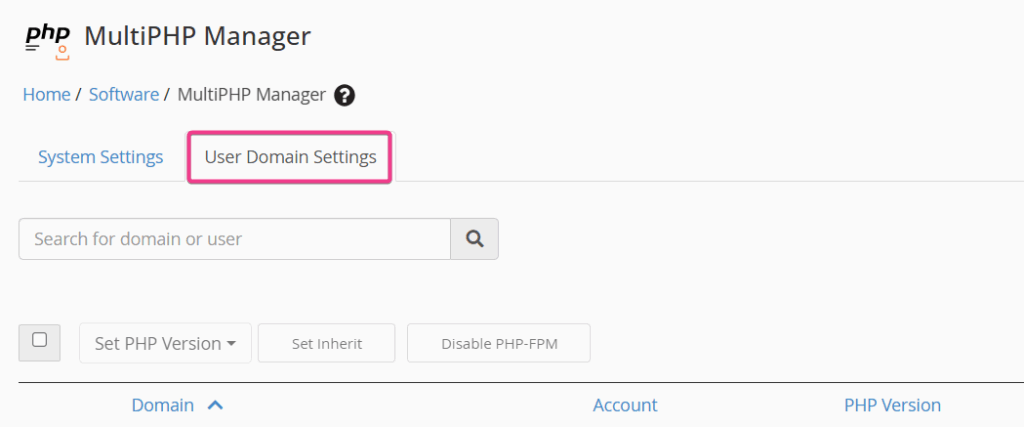
- Navigate to Software then click MultiPHP Manager and select User Domain Settings.
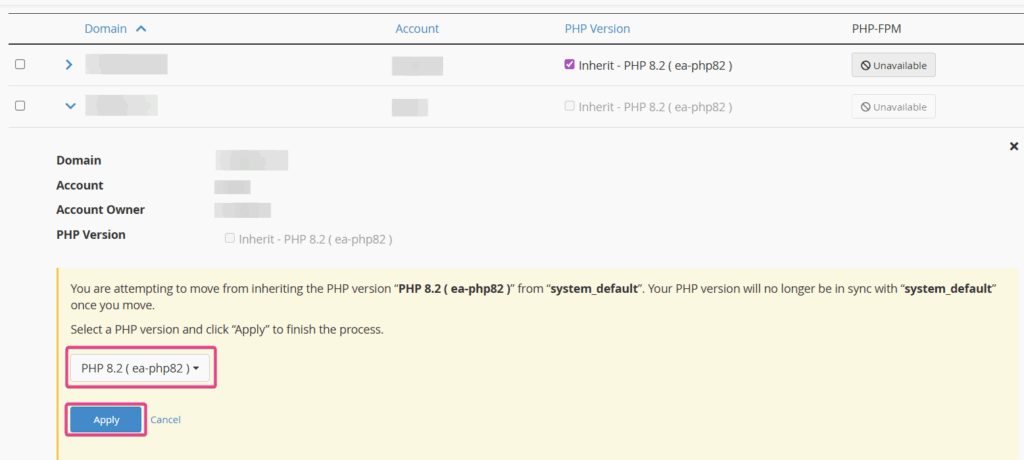
- Select the domain or subdomain you wish to update
- Choose the required PHP version from the dropdown
- Click Apply
Changes take effect immediately without requiring a server restart.
Need Further Help?
If you experience any issues after changing PHP versions, such as a site displaying errors, this may indicate a compatibility issue between the site’s code or plugins and the selected PHP version. Please contact support and we’ll be happy to assist.