Deleting a website in ULTRA Cloud Panel

While most of the time you’ll want to keep your website(s), there may be a scenario in which you no longer need it and want to remove them. For example, if it’s an old staging/development website that you no longer use and you want to remove to make space for a new website/project.
This guide will show you how to remove a website from your ULTRA Cloud Panel
Login to your www.freethought.uk account
- Login to your account Customer Portal
- Click on ULTRA Cloud Panel in the top row.
Open the Site settings
- In ULTRA Cloud, you’ll see a list of your Sites.
- Find the site you want to manage.
- Click the Settings cog icon beside that site.

Deleting the site
- Navigate to the Tools drop down in the top right.
- Select Delete site from the drop down.
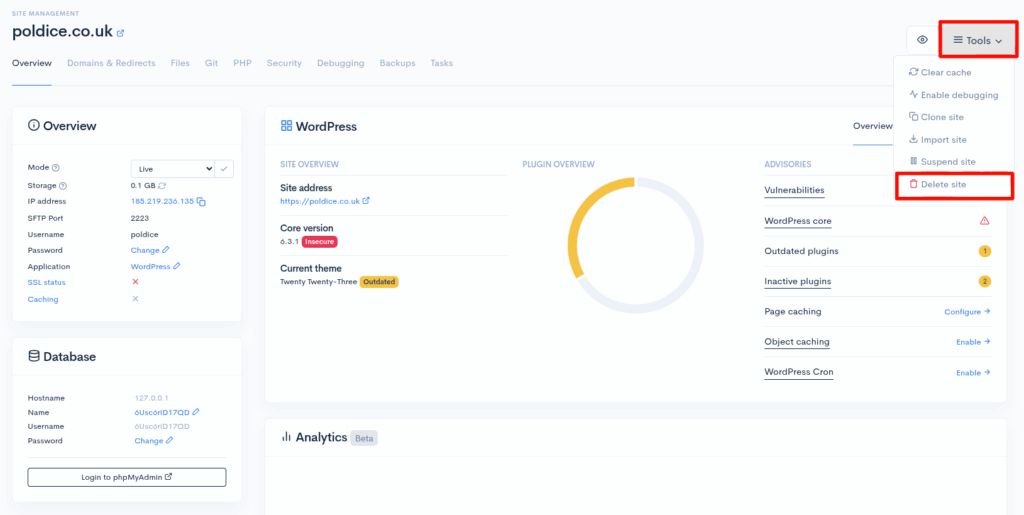
That’s it, you’ve now deleted your site in your ULTRA Cloud Panel
If you are running into any issues or have any further questions or concerns, please don’t hesitate to get in touch.